
INTRODUCTION
The purpose of this article is to facilitate LEATHER AND TEXTILE SECTOR to understand methods for invoice data sharing with FBR. Taxpayer directly connect to FBR system to upload sales invoices in bulk. This mechanism is provided temporarily to upload all the sales invoice data to FBR System till the implementation of Fiscalization Solution.
Taxpayer can directly integrate their system with FBR using the provided web service to upload the sale invoices in bulk. This web service will reside on FBR server and expose web method for the bulk data sharing from Leather/Textile taxpayers Server/POS to FBR server.
The web method will be used by Leather and Textile sector taxpayers to send invoice data to FBR server to get FBR Fiscal Invoice Number.
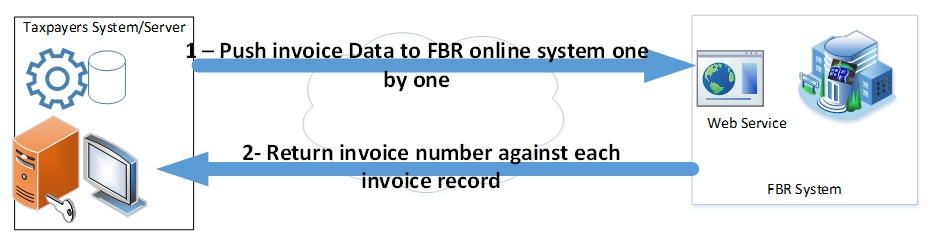
Following is the two-step process for sharing invoice data with FBR.
- Register each store (POS) in FBR system for which you want to upload the data. Details are given in Section POS Registration .
- Taxpayer will integrate their system with FBR using the provided Web Service. Details are given in Section Integration of Taxpayer System with FBR System .
SCOPE
The scope of the document is limited to technical description of FBR-IMS Web Service, web methods, data sharing details and data security implementation.
This service is being provided to Leather/Textile sector taxpayer temporarily for the bulk invoice data transformation from their POS/Servers to FBR System. Until the implementation of Fiscal Solution to all Leather and Textile taxpayers in which each and every invoice will be fiscalize on real-time basis by directly integrating the POS as per the rules/regulation mentioned in FBR S.R.O 1360(I)/2018 chapter 14.
DEFINITION AND ACRONYMS
| ACRONYMN | DEFINITION |
| FBR | Federal Board of Revenue |
| HTTP | Hypertext Transfer Protocol |
| URL | Uniform Resource Locator |
| NTN | National Tax Number |
| POS_RN | Point of Sale Registration Number |
| PB | Public Key for Signature Verification |
| PV | Private Key for Data Signing |
| EC | Encryption Key |
POS Registration
Textile and leather sector will register their POS for each branch using eFBR portal by providing the required data. Following data is required for POS registration
| Name | Status | Sample Value |
| POS Identification Number (Device No.) | Compulsory | POS-123-8D |
| NTN | Compulsory | 1000007-9 |
| Business Name | Compulsory | IDEAS by Gul Ahmed |
| Branch Name | Compulsory | F-10 Markaz Outlet |
| Business Address | Compulsory | F-10 Markaz Islamabad |
| City | Compulsory | Islamabad |
| IP Address | Compulsory | 192.68.52.01 |
| Latitude | Compulsory | 33.0254155 |
| Longitude | Compulsory | 73.254354 |
| Mode | Compulsory | Live Service |
POS Registration 01
For POS registration, log in on web site https://e.fbr.gov.pk [9] with your user credential and get registered by accessing the page Registration-> POS Client Registration
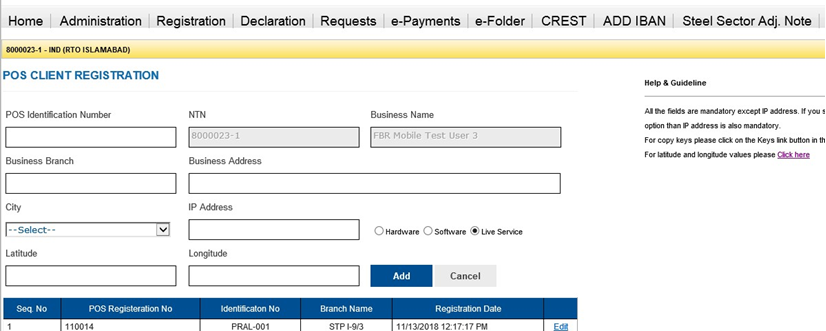
On successful submission of data, FBR will generate POS registration no which will be referenced in the compiling each invoice into required format. [10]
Source: FBR
For any queries related to Tax, SECP, Shares, Stocks or Finance write to us at finperial@gmail.com
 FINPERIAL